

View the report
1
Open Telco Reports
In the left pane, click Telco Reports. The Partner Summary tab opens by default.
2
Set the period
Select the From date and To date range.
3
Set the record limit
Set the Limit if you need more or fewer rows than the default.
4
Search
Click Search to display the report.
5
Export, if needed
Click Download to export the data.
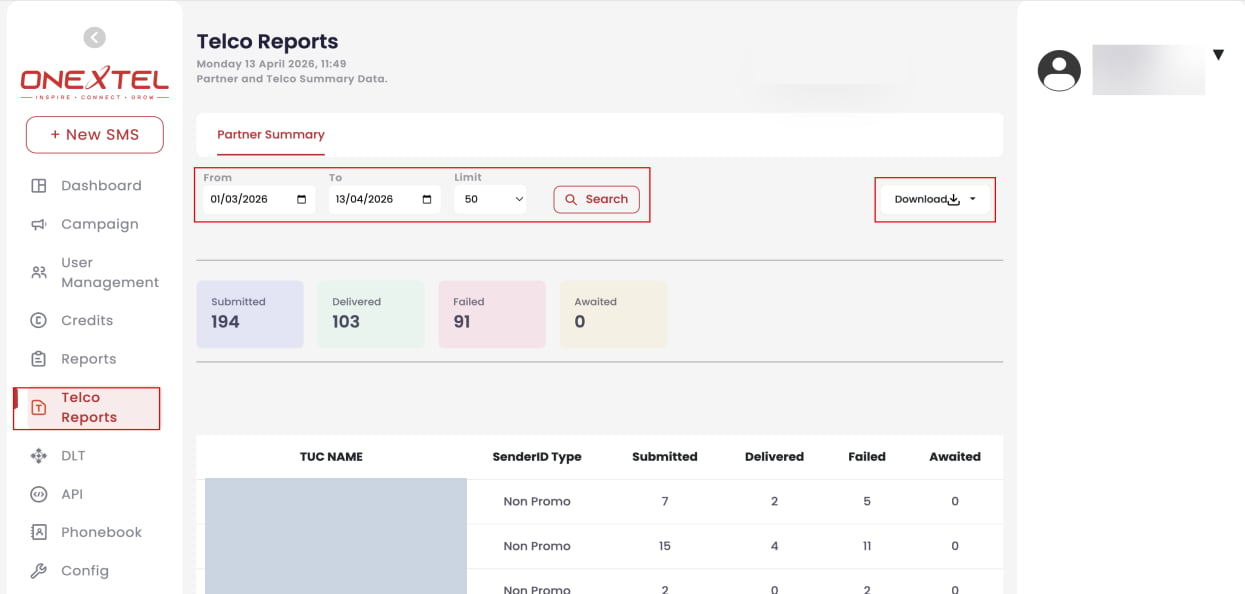
Telco Reports — Partner Summary
Reading the report
Totals appear at the top, with a per-row breakdown by TUC and sender ID type beneath.Awaited is not the same as failed. A message can sit awaited legitimately — the handset is
off, or the operator has not yet returned a receipt. Awaited counts that stay high over a long
date range, though, usually mean delivery receipts are not coming back at all, which is a
callback configuration problem rather than a
delivery one.